
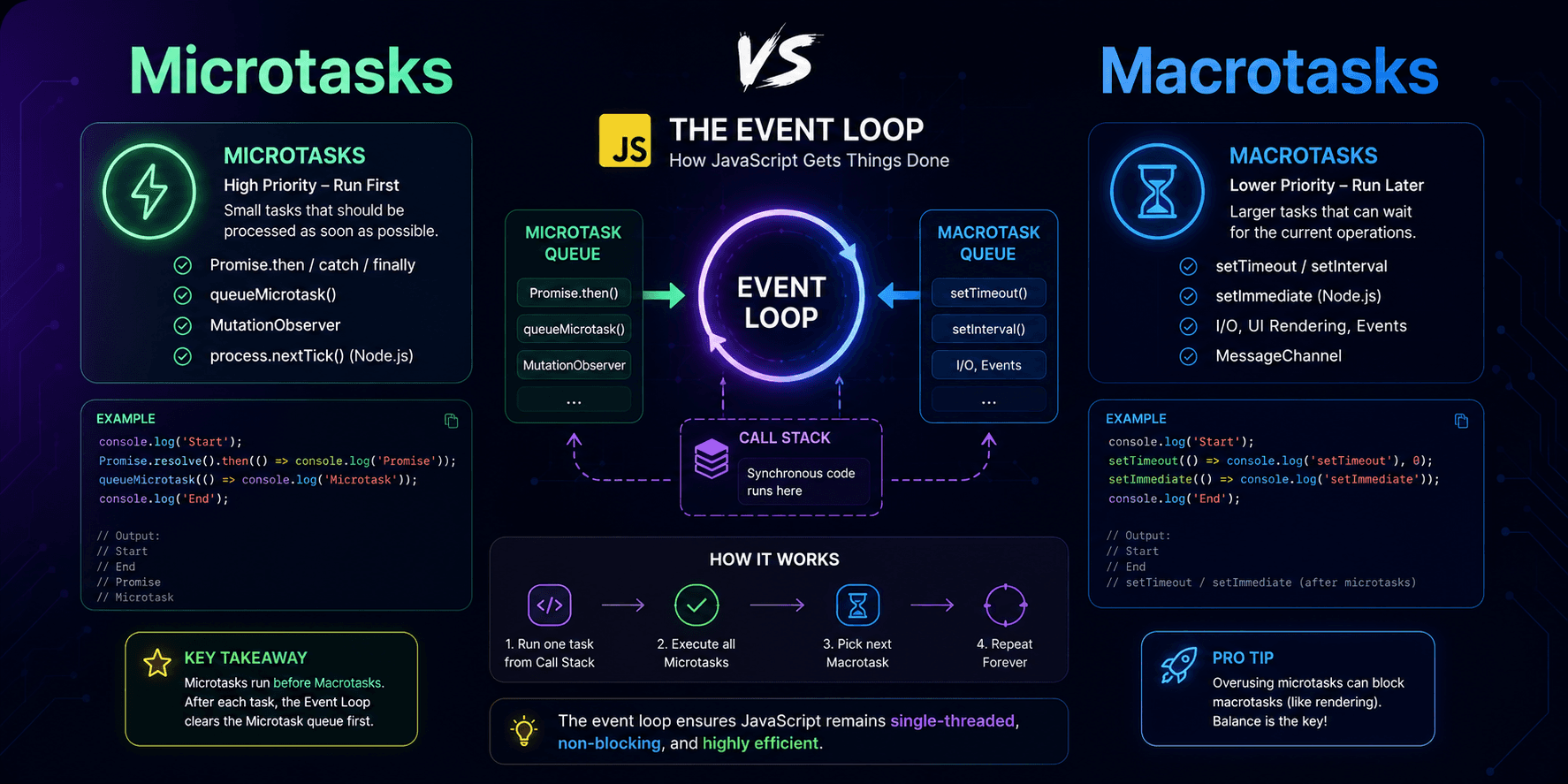
This article explains JavaScript microtasks and macrotasks in practical terms, showing why `Promise.then()` usually runs before `setTimeout(..., 0)` and how the event loop prioritizes different kinds of asynchronous work.
If you've ever seen Promise.then() run before setTimeout(..., 0), you've already touched one of the most important parts of the JavaScript runtime: microtasks and macrotasks. These two queues are central to how the event loop keeps JavaScript responsive while still executing code in a predictable order.
The diagram below is a helpful way to understand how the call stack, microtask queue, and macrotask queue interact during execution:
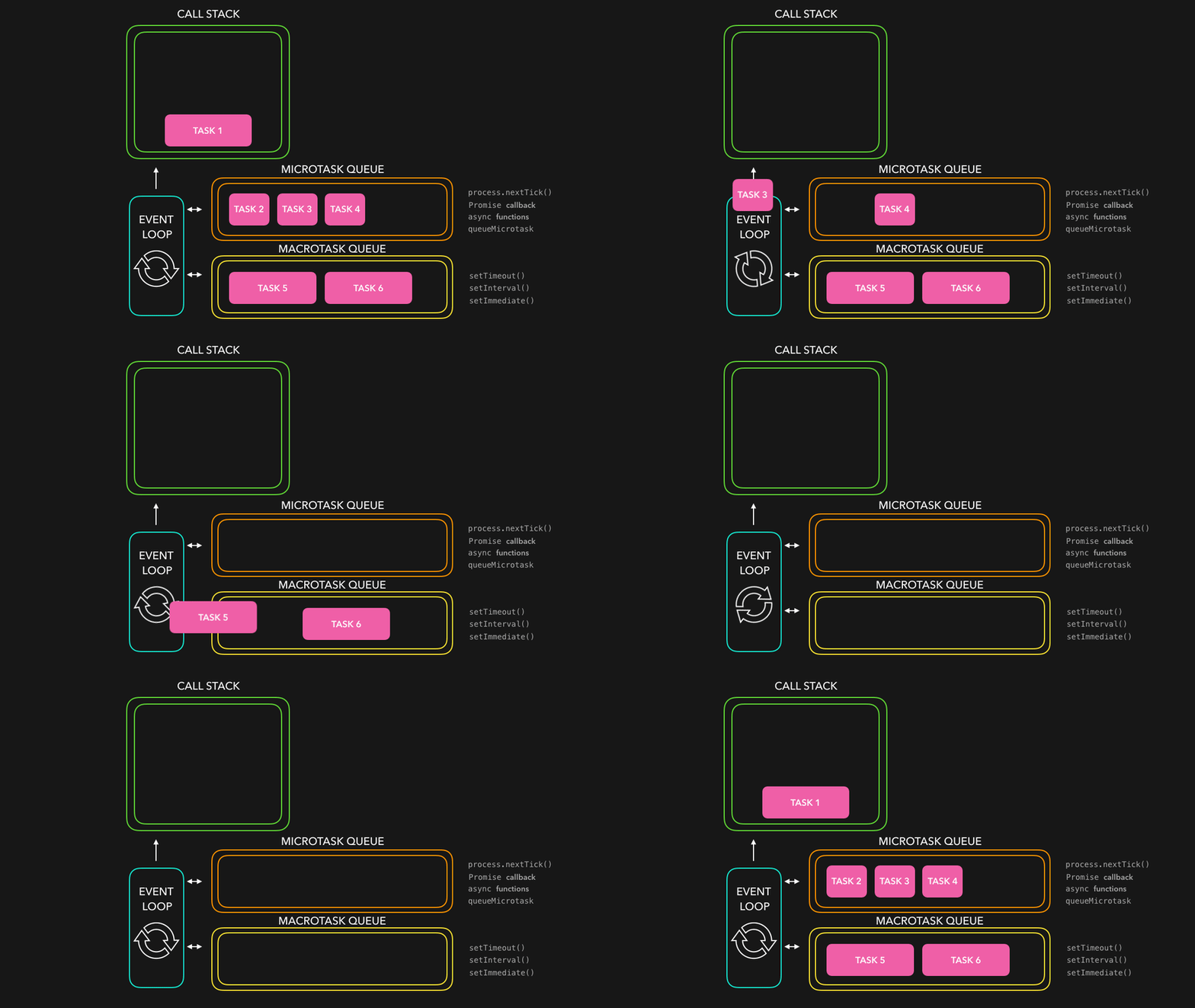
The simple way to read it: synchronous code runs first on the call stack → the runtime drains the entire microtask queue → only then does it move to the next macrotask (timer callback, I/O, etc.).
Microtasks are high-priority tasks that run right after the call stack becomes empty, before the event loop moves on to the next larger task. Common sources of microtasks:
Promise.then / Promise.catch / Promise.finallyqueueMicrotask()MutationObserver (in browsers)Key detail: After a macrotask finishes, the runtime will drain the entire microtask queue before picking up the next macrotask. That means if one microtask schedules another microtask, the new one will also run before timers, I/O callbacks, or any other macrotasks get a turn.
Macrotasks are the larger units of work handled by the event loop. They include:
setTimeout / setIntervalThe mental model is simple: each event loop turn = 1 macrotask → drain microtasks → next turn.
This is why setTimeout(fn, 0) does not mean "run immediately." It only means "queue this callback as soon as possible in the macrotask queue" — but the callback still has to wait for the current stack to finish and for all pending microtasks to be processed first.
console.log('A');

setTimeout(() => {
  console.log('B');
}, 0);

Promise.resolve().then(() => {
  console.log('C');
});

console.log('D');
Output:
A
D
C
B
| Order | Log | Reason |
|---|---|---|
| 1 | A | Sync code, runs immediately on the call stack |
| 2 | D | Sync code, runs immediately on the call stack |
| 3 | C | Promise.then → microtask, drained before macrotasks |
| 4 | B | setTimeout → macrotask, runs after microtask queue is empty |
Splitting work into microtasks and macrotasks gives JavaScript a balance between responsiveness and predictability:
This model also explains why asynchronous JavaScript feels concurrent even though the language is single-threaded at the execution level. The runtime isn't running everything at once — it's scheduling work according to event loop rules and queue priority.
setTimeout runs before Promise.thenMany people assume setTimeout(..., 0) runs before a promise callback. In reality, Promise callbacks are microtasks, so they always get processed first.
Because the runtime tries to empty the entire microtask queue before moving on, deeply nested Promise.then() chains or repeated queueMicrotask() calls can delay timers, I/O, or rendering work.
Promise.then() → microtasksetTimeout() → macrotaskWhen debugging execution order, start with one question: does this callback run immediately, go into the microtask queue, or go into the macrotask queue? Once that mental model clicks, most "weird" async JavaScript behavior becomes much easier to predict.
Continue exploring similar topics
Choosing the right names for your API endpoints is crucial for building an intuitive, consistent, and easy-to-use API.
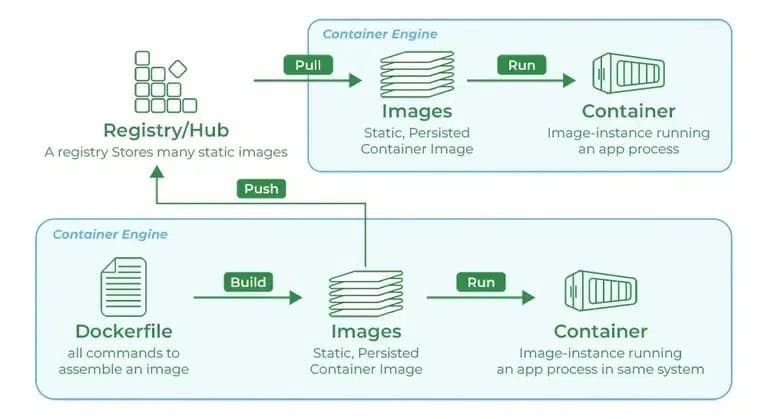
While you're working with registries, you might hear the terms registry and repository as if they're interchangeable. Even though they're related, they're not quite the same thing. A registry is a centralized location that stores and manages container images, whereas a repository is a collection of related container images within a registry. Think of it as a folder where you organize your images based on projects. Each repository contains one or more container images.
Animation Keys is a collection of essential UI animation terms that explain how motion can guide attention, provide feedback, show relationships between states, and improve the overall user experience in digital products.
Discover why I prefer type over interface in TypeScript! This post dives into its flexibility and practical advantages, helping you write cleaner, more efficient code. 🚀
Learn when and why to use React's useCallback hook to optimize your application's performance. This comprehensive guide covers practical use cases, real-world examples, common pitfalls, and best practices to help you make informed decisions about memoizing functions in your React components.